top of page


The Designer's Sharpest Tool
A review of three well-known editing programs catering to users with different needs.
By Joey Ong

The poster isn’t going to put itself together, and Microsoft Paint just isn’t cutting it anymore. You’re looking for an easily accessible program with all the tools you need for your project, with none of the hassle. Fret not, we reviewed three editing programs to determine which is the best starting point for you.
Photoshop
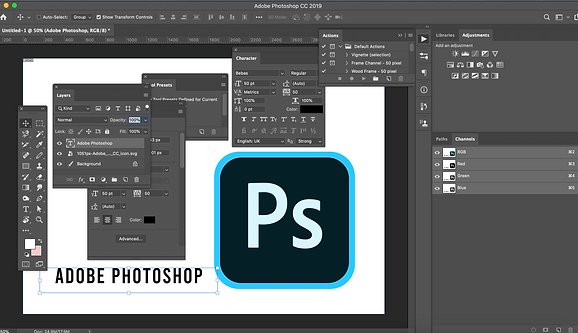
This screenshot shows off the sheer number of tools and options at one’s
disposal using Adobe Photoshop. Screenshot: Joey Ong

Photoshop is such a widespread household name that people use “Photoshopping” to refer to image manipulation in general. To find out the secret to their success, I asked Mr Melvin Goh, a lecturer teaching an Adobe Photoshop course in Ngee Ann Polytechnic.
“[Photoshop has] regular updates which include new tools and features that help the user achieve their tasks more efficiently and effectively,” says Mr Goh.
However, its frequent updates are also a source of frustration. “[The regular updates] tend to confuse users because older features are removed,” he says. “There are some rare instances of the software behaving unpredictably like unable to zoom in, due to the frequent updates without quality control prior to release.”
Furthermore, Photoshop is locked behind a paywall. According to Adobe’s website, the most affordable way to obtain Photoshop is through its Photography package, costing $13.14 dollars a month.
GIMP

This screenshot shows the heavy similarities between GIMP and Photoshop’s
spread of tools and layout. Screenshot: Joey Ong
At first glance, GNU Image Manipulation Program (GIMP) is similar to Adobe Photoshop. However, there are several key differences.
GIMP is freeware, meaning you can obtain it and all of its functions without paying a single cent which is “good for broke people like me,” according to Mr Nabeel Daud, 19, an avid GIMP user.
According to Techsoup Singapore, the GIMP community provides help by answering questions and even making tutorials. However, there are still fewer tutorials online as compared to Photoshop, so it is still more difficult to learn from others.
GIMP also has fewer tools than Photoshop. Photoshop, for example, has four different healing brush tools compared to GIMP’s one healing brush.
All this is forgivable when you consider it is a completely free product. Despite having a steeper learning curve and being less powerful than Photoshop, it is still a very usable tool.
“It’s got basically every feature you could ask for if you’re only using it for casual stuff,” says Mr Daud.

Canva

This screenshot displays Canva’s visually appealing variety of templates.
Screenshot: Joey Ong
Canva is a free-to-use browser editor, so you don’t have to install it onto your computer to use it. Its biggest selling point is its simplicity. Canva has dozens of templates and elements available with just a few clicks, letting you design anything with ease.
“The templates are aesthetically pleasing and Canva itself is quite easy to use,” says Lidya Insyirah, 18, a student. “[I use Canva] when I want to make a collage of pictures and when I have to make aesthetically-pleasing posts.”
Canva is great for simple designs, but it cannot handle complex projects as it has very few tools available to it. According to Vinleon Ang from Singapore Business Owners, he wrote on the website that Canva is incapable of functions such as applying layer styles or pixel-accurate guides. Furthermore, Canva’s options are further limited by how it locks many of its elements and tools behind premium paywalls.
“[Canva] frustrates me because I can’t afford to pay for the membership, and many of the options I want to use are only meant for the membership holders,” says Lidya.
Ultimately, all three programs offer their own set of strengths and weaknesses. Aspiring professionals will naturally gravitate towards using Photoshop. Casual users on other hand may choose GIMP if they need complex tools, or Canva if they desire simple, painless tools. If you are just starting out, I think Photoshop is the best option. The abundance of guides and resources online will help you past problems you may face starting out.
Mr Goh says, “[Photoshop is] a widely used tool, you can easily Google for the solution. If you face an issue, there's likely a solution somewhere.”

1 June 2020
About the Author

Joey Ong
Joey is an easy-going person with a penchant for goofy humour. He’s always ready to help out a friend, and never hesitates to compliment someone when he sees the opportunity to.
bottom of page